
NetSplit
Per-application network routing utility for Windows 11. Bind individual desktop apps, games, and background tasks to specific network adapters via Windows Filtering Platform (WFP) without DLL injection or binary tampering.
NetSplit: Per-Application Network Routing for Windows 11
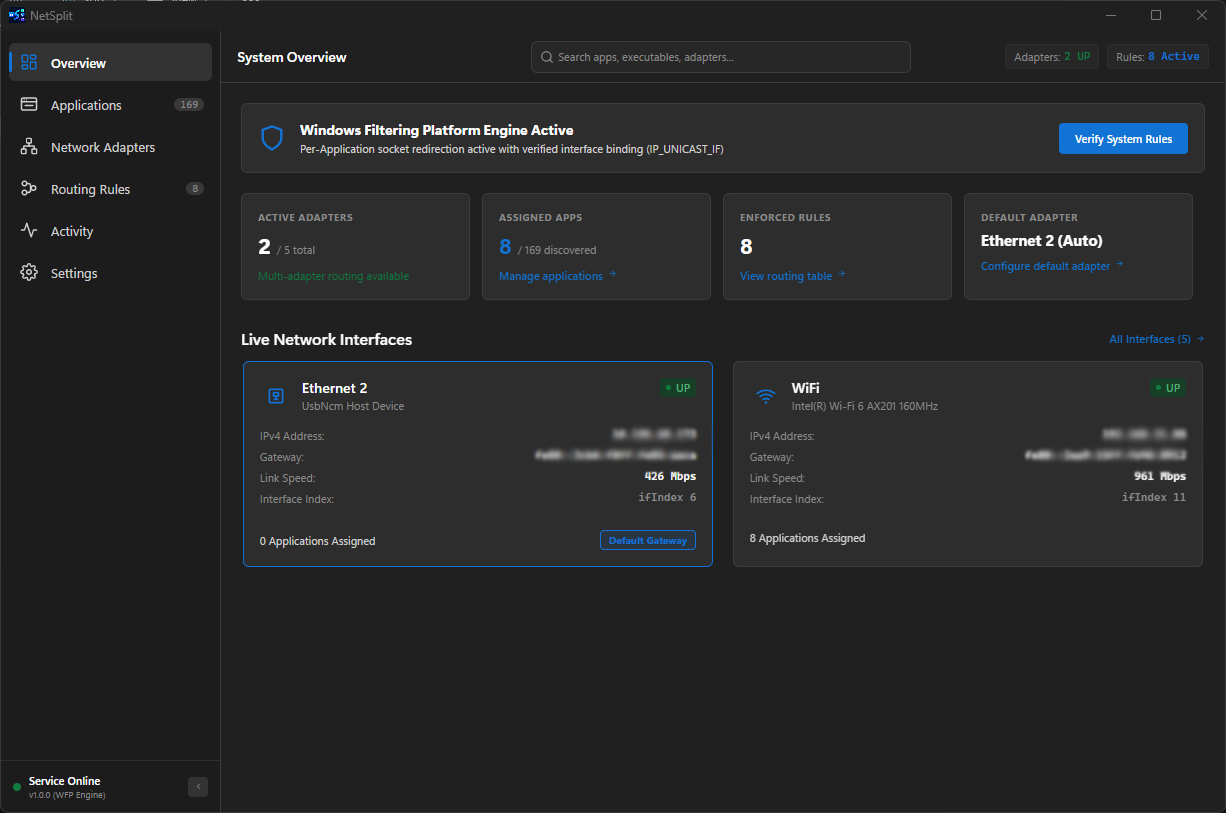
Welcome to the in-depth technical overview of NetSplit, a specialized Windows 11 utility engineered to bind individual desktop applications, games, and background tasks to specific network adapters (such as Ethernet, Wi-Fi, 4G/5G USB tethering, or secondary network cards).
Unlike conventional routing tools, NetSplit operates without modifying application binaries, without injecting DLLs (no AppInit_DLLs or CreateRemoteThread), without hooking APIs (no Detours or MinHook), and without altering the global Windows default routing table.
1. Primary Use Cases
Multiplayer Gaming With Low Ping While Live Streaming
Live streaming applications like OBS Studio or Streamlabs continuously upload high-bitrate video streams. When stream uploads share the same network interface as games like Valorant, Counter-Strike 2, Apex Legends, or Rocket League, network buffers congest (bufferbloat), resulting in severe latency spikes, rubber-banding, and packet loss.
- Low-Latency Connection: Dedicate your primary fiber or low-jitter wired Ethernet interface exclusively to the game executable, locking in consistent 10–20 ms ping.
- Throughput Connection: Route OBS, Streamlabs, Twitch chat bots, and encoders through a secondary Wi-Fi or mobile hotspot connection, eliminating contention.
High-Speed Downloads & Torrents Without Lagging Work
Large downloads on Steam, Epic Games Launcher, Battle.net, or BitTorrent saturate bandwidth by opening hundreds of concurrent connections, causing web browser timeouts and voice stutter in Zoom or Teams meetings.
- Direct heavy download managers through secondary Wi-Fi or tethering.
- Keep video calls, web browsers, and work communication tools on the primary network interface.
Corporate VPN Isolation for Personal Apps
Enterprise VPN clients (Cisco AnyConnect, GlobalProtect, OpenVPN) often capture all machine traffic, forcing personal Spotify streams, Discord calls, and YouTube playback through corporate gateways subject to company monitoring and bandwidth throttling.
- Assign work tools, SSH clients, and corporate browsers to the VPN virtual network adapter.
- Assign personal browsers, music streaming, and games to your local physical Wi-Fi or Ethernet adapter, completely bypassing the VPN tunnel.
Continuous Cloud Backup & Multi-ISP Testing
- Cloud Sync Isolation: Isolate background backup services (OneDrive, Google Drive, Backblaze) to a cellular or auxiliary connection so real-time meetings never drop frames.
- Side-by-Side ISP Testing: Web developers and network engineers can test regional CDN delivery, latency, and failover side by side on a single machine by binding separate browsers or curl instances to different ISPs.
2. Technical Routing Mechanism
NetSplit implements a robust two-tier routing architecture designed natively for Windows 11:
1. Windows Filtering Platform (WFP) ALE Connect Redirection
The privileged daemon configures non-intrusive kernel filters at the FWPM_LAYER_ALE_CONNECT_REDIRECT_V4 layer. When an outbound socket connection is initiated by a matched process image path (e.g. C:\Games\Game.exe), WFP transparently redirects the connection attempt to NetSplit's internal loopback proxy socket.
2. Socket Interface Binding (IP_UNICAST_IF)
The transparent proxy broker socket sets the IP_UNICAST_IF option via setsockopt using the target network adapter's interface index (ifIndex). The Windows TCP/IP stack directly binds the connection to the designated physical or virtual network interface without altering the Windows routing table.
Dynamic Session Cleanliness
All kernel filters are registered using dynamic sessions (FWPM_SESSION_FLAG_DYNAMIC). If the NetSplit service stops or restarts, the Windows kernel automatically flushes every filter, guaranteeing zero lingering rules or broken network connectivity.
3. System Architecture
+-----------------------------------------------------------------------------------+
|                         React Native Windows Desktop UI                           |
|                    (Standard User Privileges - Medium IL)                         |
|                                                                                   |
|  [Overview] [Applications] [Adapters] [Routing Rules] [Activity Log] [Settings]   |
|                                     |                                             |
|                     Zustand Store / Typed JSON-RPC Client                         |
+-------------------------------------|---------------------------------------------+
                                      | JSON-RPC 2.0 over Secure Loopback HTTP
                                      | http://127.0.0.1:48192 (Ephemeral Token Auth)
                                      v
+-----------------------------------------------------------------------------------+
|                           NetSplit Windows Service                                |
|                        (NT AUTHORITY\SYSTEM or Service)                           |
|                                                                                   |
|  +-------------------------+  +--------------------------+  +------------------+  |
|  | IPC Server & Auth Gate  |  | Assignment Manager       |  | App Discovery &  |  |
|  | (127.0.0.1 token auth)  |  | (Exclusive, JSON journal)|  | Running Mon      |  |
|  +-------------------------+  +--------------------------+  +------------------+  |
|                                     |                                             |
|  +------------------------------------------------------------------------------+ |
|  |                        NetSplit Routing Engine                               | |
|  |                                                                              | |
|  |  [Adapter Enumerator]        [WFP ALE Filter Manager]    [Redirect Broker]   | |
|  |  (GetAdaptersAddresses,      (FwpmFilterAdd0,            (IP_UNICAST_IF      | |
|  |   IP Helper, Netlink events)  ALE_CONNECT_REDIRECT)       transparent proxy) | |
|  +------------------------------------------------------------------------------+ |
+-----------------------------------------------------------------------------------+
4. Core Guarantees
- Zero Binary Tampering: No DLL injection, no API hooking, and zero modifications to third-party game or application binaries.
- Anti-Cheat Safe: Fully transparent to kernel-level anti-cheat software including Riot Vanguard, Easy Anti-Cheat (EAC), BattlEye, and Valve Anti-Cheat (VAC) by functioning entirely within standard Windows network filtering boundaries.
- Privilege Isolation: The frontend desktop UI runs with standard user permissions (Medium Integrity Level). Privileged actions are handled exclusively by the background C++ Windows Service communicating over an authenticated local loopback channel with an ephemeral 256-bit token.
- Strict Exclusive Assignment: Applications can only be assigned to one adapter at a time. All conflicting rules are resolved atomically.
- Safe Fallback Policies: If an assigned adapter is unplugged or disconnected, applications seamlessly fall back to the default network connection according to user policy.
5. Hardware Feasibility Verification
Dual-interface socket binding was verified on live Windows 11 hardware with two active connections (Wi-Fi 6 AX201 and 4G USB Tethering):
====================================================================
   NetSplit: Technical Feasibility Proof of Concept Output
   Independent Process and Socket-Level Network Interface Binding
====================================================================

--- Testing Adapter: Ethernet 2 (Index: 6, Local IP: 10.232.65.65) ---
  [SUCCESS] setsockopt(IP_UNICAST_IF, ifIndex=6) applied.
  [BOUND] Local socket endpoint: 10.232.65.65:53372
  ===> RESULT: TCP Traffic successfully routed through adapter [Ethernet 2]!
       Observed Public Egress IP: 47.31.115.112
  [SUCCESS] UDP DNS query to 1.1.1.1 succeeded via Ethernet 2 (Received 61 bytes).

--- Testing Adapter: WiFi (Index: 11, Local IP: 192.168.31.85) ---
  [SUCCESS] setsockopt(IP_UNICAST_IF, ifIndex=11) applied.
  [BOUND] Local socket endpoint: 192.168.31.85:53373
  ===> RESULT: TCP Traffic successfully routed through adapter [WiFi]!
       Observed Public Egress IP: 49.37.73.231
  [SUCCESS] UDP DNS query to 1.1.1.1 succeeded via WiFi (Received 61 bytes).